



Pillage in disguise with Arc Raiders’ live in-game voice changer


Arc Raiders is in full swing, with hundreds of thousands of eager looters running around the lands of future Earth in search of high-value gear to take back to Speranza.
Since it is a multiplayer extraction title, it naturally has proximity chat, but what if we were to tell you that you can replace your voice in-game with an in-built feature?
You can change your voice in Arc Raiders
The aptly named ‘Raider Voice’ is essentially a complete voice changer made for the game, allowing you not only to disguise your voice but also enhance immersion if you like a little roleplay.
It’s incredibly easy to use; all you have to do is enable it, simply talk in-game as normal, and instead of your normal voice, the one you choose will be output instead, making for some fun interactions.
It is in ‘beta’ currently, but there are a bunch of different voices to pick from, which is useful, especially if you’re in a party with others wanting to also use this feature.
It’s not quite clear as to how this voice changer works since there’s no additional program installed, but there are suggestions that there is an AI element at play here, allowing for real-time masking while also keeping pitch and other elements of your speech.
Comment
byu/TheOshino from discussion
inArcRaiders
Since Embark Studios has already noted that it is using AI on NPC voice lines both in this game and The Finals, it’s highly likely that it has managed to create this innovative feature using whatever tech it has going on over there.
How to change your voice in Arc Raiders
If you like the idea of masking your true voice in Arc Raiders, it’s an extremely simple process to do so.
All you have to do is open up your in-game settings menu and tab over to the ‘Audio’ section where, if you scroll down, you should be able to see the ‘Raider Voice Beta’ options.
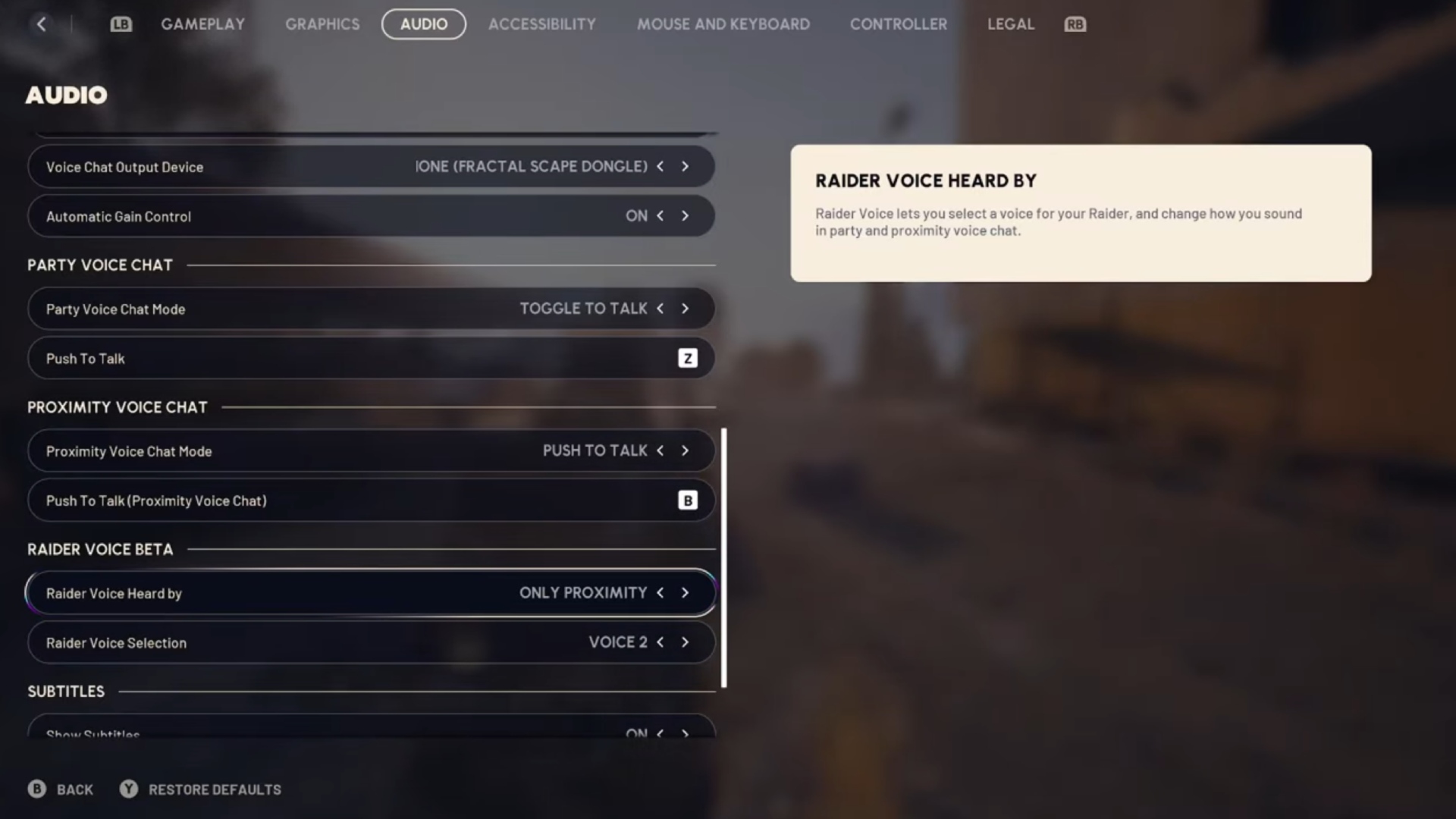
Here, you can select when you want the voice to activate – only proximity, only party, or both. If you are doing some runs in a party, it’s likely you’ll opt for the only proximity option so those comms between your team are nice and clear.
You can also change up which voice you want to output too, so test a few out and find one that fits the vibe you’re going for!
Latest Gaming News
All News